
At a glance
- Dialtone's typography, shadows, and gradients are now in Figma as styles.
- They're in the same Dialtone Design Tokens 2026 library as the variables from Part 1, which is already published. If your file already uses it, there's nothing to import.
- Styles bundle multiple variables. As an example, instead of picking font family, size, and weight one variable at a time, a text style applies them together.
- Styles are bound to the variables wherever Figma allows it, and both are generated from the same design tokens. Code is still the source of truth.
- Components are next, and they'll be built on top of styles and variables.
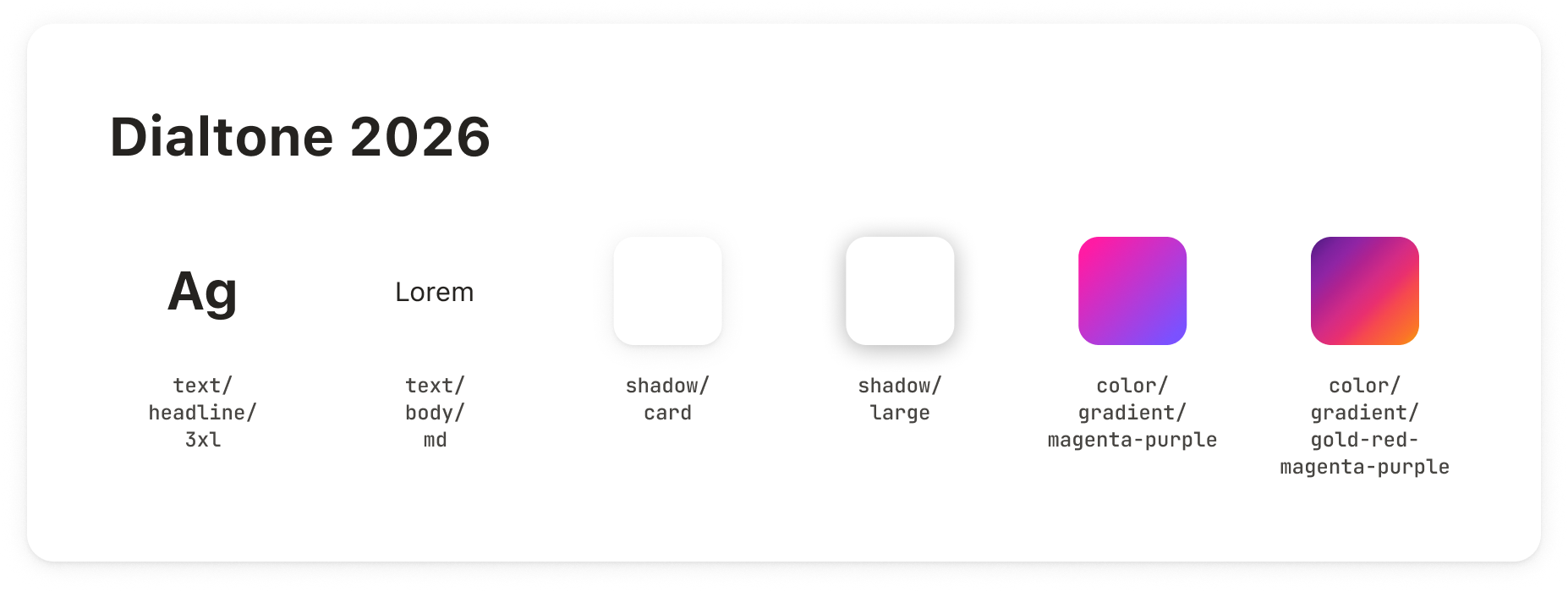
What's included
- Text styles (29): 19 for headlines, body text, labels, and code, in every size (e.g.,
text/headline/xl,text/body/md), plus 10 for buttons and form inputs (e.g.,typography/button/md,typography/inputs/md). A style sets the font family, size, weight, and line height together. - Shadow styles (8):
shadow/small,shadow/medium,shadow/large,shadow/extraLarge, andshadow/card, plus the three focus-ring styles:shadow/focus,shadow/focus-inset, andshadow/focus-outset. - Gradient styles (3): the three Dialtone gradients, each applied as a Figma paint style:
color/gradient/magenta-purple,color/gradient/gold-red-magenta-purple, andcolor/gradient/orange-red-magenta-purple.
The headline, body, label, and code style names mirror the variant prop of DtText, so <dt-text variant="body-md"> in code is text/body/md in Figma. If you're translating a design into code, or asking an AI agent to, the style name tells you which variant to use. The button and input styles don't map to DtText; they match the typography of those components.
One style replaces four separate choices: the text layer takes the font family, size, weight, and line height of the style.
Applying shadow styles from the library.
Applying gradient styles from the library.
Why styles come second
Styles are built on top of variables: each one binds its fields (font family, size, and weight; shadow colors, blur, spread, and offsets; gradient color stops) to the matching variables where they exist. That's why Part 1 came first.
Variables alone work, but they're tedious: a single text layer needs a font family, size, and weight picked one by one. A style gives you all of it in one click, using a combination Dialtone already defines (e.g., text/body/md matches font: var(--dt-text-body-md)).
Styles also help developers: a shadow style named shadow/card points to the token to use in code, where a bare stack of blur and offset values doesn't.
Our (technical) approach
Synchronizing styles needs a manual step, because of a Figma limitation. Figma's API can write variables, but it can't write styles (or components). A style can only be created from a Figma plugin, so we needed a different approach from the one we took for variables.
The sync works in four steps:
- A resolver (a script) reads Dialtone's tokens and computes each style: the 29 text styles, the 8 shadows, and the 3 gradients. It reuses the same code as the variables sync, so a style can't drift from the variable it's bound to.
- A small local server on a developer's machine serves those results to the plugin as JSON.
- The plugin, running inside Figma, creates each style (or updates it, if it already exists), and binds each field to the matching variable by name.
- The plugin reports what it did: how many styles it created, updated, skipped because nothing changed, or failed to sync.
Unlike variables, styles aren't synced by a GitHub workflow. A plugin has to run inside Figma, and that can't happen on a CI machine, so we run it manually when the tokens change, then republish the library. Styles may briefly lag behind the tokens as a result.
What's next
Components come next. This will be harder than styles, and we want to keep code as the source of truth: once a component changes in Dialtone, we can re-run the sync and Figma gets the update. As with styles, every component will be bound to variables.
Limitations
Figma styles can't represent everything Dialtone's tokens can.
The main difference is line height. Dialtone's line heights are unitless (e.g., 1.6), but Figma reads a bound variable as pixels, so 1.6 becomes 1.6px. Text styles carry a plain percentage instead (e.g., 160%), as promised in Part 1, so that percentage only updates when we re-run the sync.
There are also a couple of smaller gaps:
- Gradients are tuned for square shapes. A Figma style can't know the shape it fills, so on a wide rectangle the color stops land differently than in code. Adjust the handles on the layer for an exact match.
- Gradients use light-mode values. A style can't switch with the mode, so fixed-color gradients (as in
color/gradient/gold-red-magenta-purple) have no dark version. Stops bound to a variable still follow the mode.